
Getting a PNP Clearance is an important step for anyone who needs to prove they have no criminal record in the Philippines. Whether you are applying for a job, starting a business, travelling abroad, or completing government requirements, this document is often required.
The Philippine National Police (PNP) now makes the process more convenient through the National Police Clearance System (NPCS), an online platform that allows you to register, apply, and schedule an appointment easily.
This 2026 guide will walk you through everything you need to know about the PNP Clearance online registration process including requirements, payment, appointment scheduling, and how to download your clearance certificate after approval.
What Is PNP Clearance?
A PNP Clearance, also known as a Philippine National Police Clearance, is an official document issued by the Philippine National Police that certifies a person has no criminal record or pending case within their area of jurisdiction. It serves as proof of good conduct and is often required for employment, business permits, travel abroad, or government transactions.
Unlike the NBI Clearance, which checks records nationwide, the PNP Clearance focuses on cases recorded in local and regional police databases. Despite this difference, it is widely accepted and recognized by both government agencies and private institutions across the Philippines as valid proof of an individual’s clean police record.
Why Register Online for PNP Clearance?
Registering online through the National Police Clearance System (NPCS) makes getting your PNP Clearance faster and more convenient. You can create an account, fill out your details, and schedule an appointment without visiting the station in person first. This helps you avoid long lines and manual paperwork. The online system also maintains digital records, enabling faster verification and easier tracking of your application. It’s mobile-friendly and accessible anywhere in the Philippines, making it the most efficient way to apply for your PNP Clearance today.
Who Needs a PNP Clearance?
A PNP Clearance is required in many situations where proof of good conduct is needed. It is commonly requested for the following purposes:
- Job applicants – for both local employment and overseas job applications.
- Business owners – when applying for business permits or licenses.
- Students – for internship programs or scholarship applications.
- Professionals – for renewing licenses such as PRC, security, or other regulated professions.
- OFWs and visa applicants – as part of pre-employment or travel document requirements.
Having a valid PNP Clearance helps verify your identity and ensures your record is clean.
PNP Clearance Online Registration Requirements
Before starting your PNP Clearance online registration, make sure you have all the required documents and details ready. The list of requirements depends on whether you are a first-time applicant, a returning user, or fall under a special category.
For First-Time Applicants:
- One (1) valid government-issued ID, such as:
- PhilSys (National ID)
- Passport
- Driver’s License
- SSS, GSIS, or UMID Card
- Voter’s ID or Postal ID
- Active email address and mobile number for registration and notifications.
- Payment fee of ₱150, plus a ₱10–₱30 service fee depending on your chosen payment method.
For Returning Users:
- Old clearance number or reference ID from your previous application (if available).
- Updated personal details on your National Police Clearance System (NPCS) account before reapplying.
For Special Cases:
- Married women: Bring a marriage certificate to update your name or personal details.
- Foreign residents: Present your passport and Alien Certificate of Registration (ACR).
Note:
All IDs must be original, valid, and not expired. Photocopies or digital copies are not accepted during your appointment. Preparing these requirements in advance helps you avoid delays and ensures a smooth process during your PNP Clearance application.
How to Register for PNP Clearance Online (Step-by-Step Guide)
Follow these simple steps to complete your PNP Clearance online registration using the National Police Clearance System (NPCS). Make sure your internet connection is stable and your ID is ready before starting.
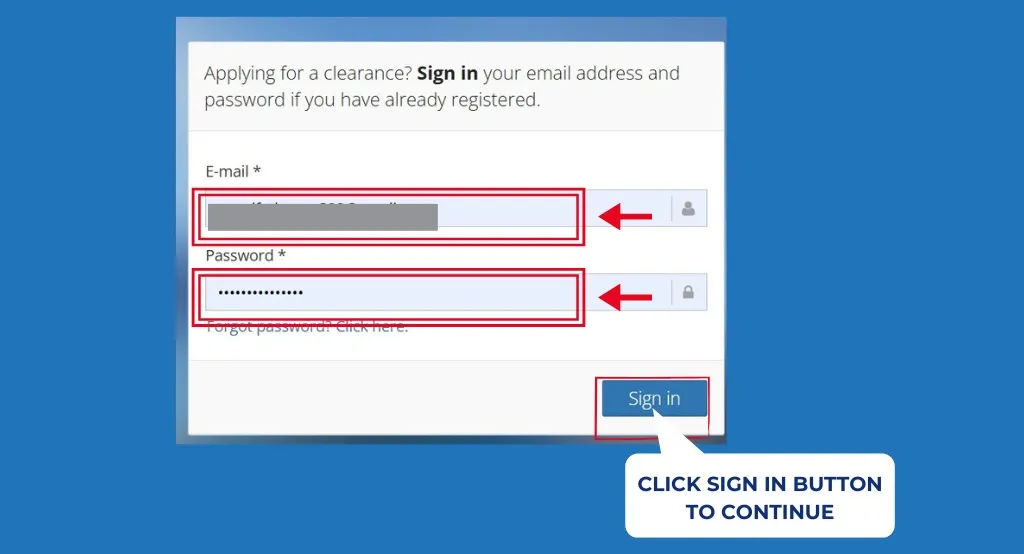
Step 1: Visit the Official NPCS Website
- Go to pnpclearance.ph.
- For first-time users, click “Register.”
- If you already have an account, click “Login” and enter your credentials.
Step 2: Create an Account
- Enter your full name, valid email address, and password.
- Read and agree to the Terms and Conditions.
- Check your email inbox and click the confirmation link sent by the NPCS to activate your account.
Step 3: Complete Your Profile
- Log in to your account and fill out your personal information, including your address, birth date, gender, and valid ID details.
- Review all entries carefully to ensure the spelling and capitalization match your ID exactly.
Step 4: Upload a Valid ID
- Upload a clear image of your chosen valid ID, front and back.
- Accepted file formats: JPG or PNG, maximum size 2 MB per file.
Step 5: Apply for Clearance
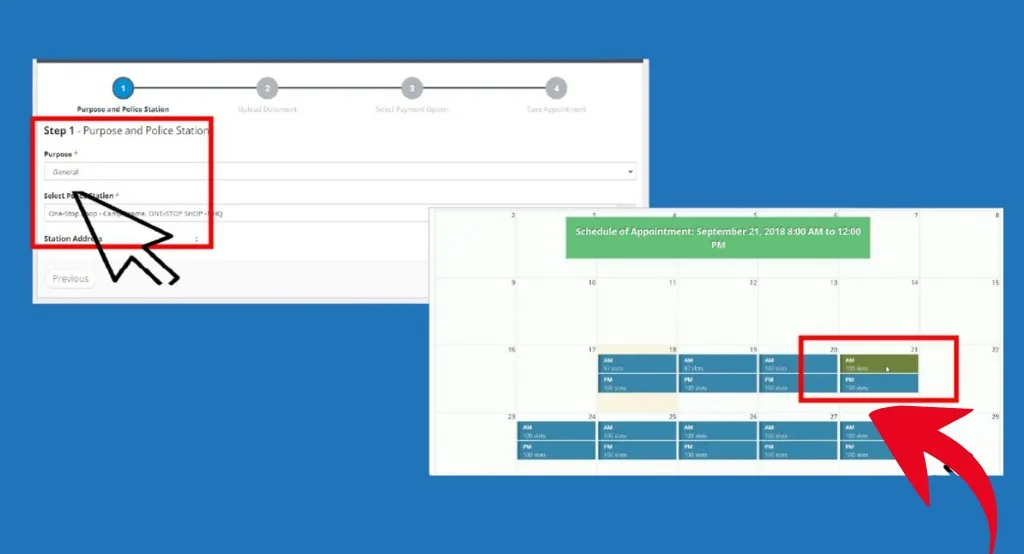
- On your dashboard, click “Clearance Application.”
- Select the purpose of your clearance such as employment, travel, or business.
- Choose your preferred police station where you’ll have your biometrics captured.
Step 6: Schedule an Appointment
- Pick an available date and time for your appointment.
- The system will automatically generate your reference number after confirmation.
Step 7: Pay the Clearance Fee
- The standard fee is ₱150, plus a ₱10–₱30 service charge, depending on the payment method.
- Pay through GCash, PayMaya, LandBank, or 7-Eleven.
- Use your reference number when completing the payment transaction.
Step 8: Print Your Application Form
- After payment, download and print your application form and official receipt.
- Bring these documents with your valid ID on the day of your appointment.
Step 9: Visit the Police Station for Photo and Fingerprints
- On your appointment date, go to your chosen police station.
- Bring your valid ID, printed application form, reference number, and payment receipt.
- The officer will take your photo and capture your fingerprints for verification.
Step 10: Clearance Release and Renewal
- After verification, your PNP Clearance will be processed and released at the station.
- You may also download a copy from your NPCS account if available
- You can repeat the same process for police clearance renewal online.
How to Pay for PNP ( Philippine National Police) Clearance Online
Paying for your PNP Clearance is quick and convenient using several available options: GCash, PayMaya, LandBank Link.Biz, 7-Eleven, and Bayad Center.
Here’s how to pay using GCash:
- Open the GCash app on your phone.
- Tap Pay Bills → Government → PNP – Police Clearance.
- Enter your reference number and the total amount shown on your NPCS account.
Confirm your payment and save the receipt.
Always screenshot or print your payment confirmation as proof before your appointment. This ensures your payment is properly verified in the system.
For a complete step-by-step police clearance payment guide, visit our detailed article:
Validity of PNP Clearance
A PNP Clearance is valid for six (6) months from the date it is issued. After this period, it automatically expires and cannot be renewed. Applicants must go through the online registration and application process again to get a new clearance.
Some employers or agencies may require a clearance issued within the last three (3) months, so it’s best to check their specific requirements before submitting your document. Keeping track of your clearance date ensures you always have a valid certificate ready for job applications, business permits, or government transactions.
For detailed information, read our full guide on Police Clearance Validity.
Common Issues and Troubleshooting in PNP Clearance
Even with the online system, applicants may experience a few common issues while processing their PNP Clearance. Here’s how to handle them:
Issue 1: Payment deducted but not reflected
Wait at least 24 hours as the payment may take time to process. If it still doesn’t appear, contact the PNP ITMS Helpdesk for verification.
Issue 2: Wrong details on form
Always review your profile before submitting. If you notice any mistakes, update your details in your NPCS profile before applying for clearance.
Issue 3: “HIT” status delay
A “HIT” means your name matches an existing record. Wait for notification or follow up through email or by visiting your chosen police station.
Issue 4: Can’t log in
Use the Forgot Password option to reset your credentials through your registered email.
Conclusion
Getting your PNP Clearance online is now easier and faster through the National Police Clearance System (NPCS). Simply follow the main steps: registration, payment, appointment, biometrics, and downloading your clearance. The online process is safe, efficient, and helps you avoid long lines at the station.
Frequently Asked Questions (FAQs)
1. How much is the PNP clearance fee in the Philippines?
The standard PNP Clearance fee is ₱150, plus a ₱10–₱30 service charge depending on your chosen payment method such as GCash, PayMaya, or LandBank Link.Biz.
2. Can I pay the police clearance fee after my appointment date?
No. You must pay the fee before your appointment to confirm your slot. The system automatically cancels unpaid applications.
3. Is police clearance valid for both local and abroad use?
Yes. The National Police Clearance is accepted for local employment, travel, and other government transactions. However, for visa or overseas use, check the embassy’s specific requirements.
4. How long does it take to process PNP clearance?
Usually, the clearance is released on the same day of your appointment unless you receive a “HIT,” which may take a few days to verify.
5. Can I apply for PNP clearance without a government ID?
No. You must present at least one valid government-issued ID to apply for or claim your PNP Clearance.